Day 19 Beginner
Challenge 19 of 100
Upload Images
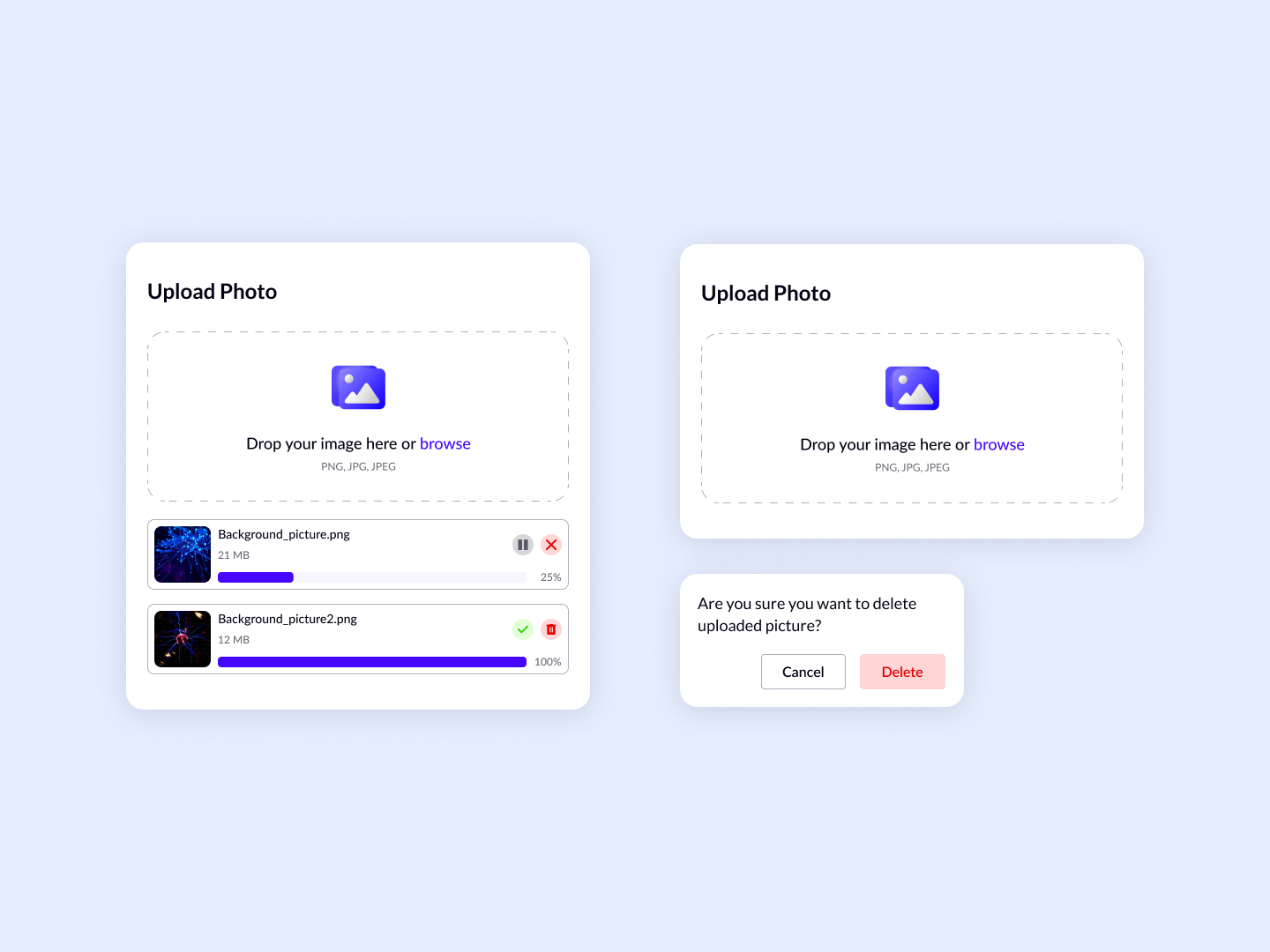
As a user who frequently works with digital images, I want a user-friendly and efficient photo upload interface that allows for easy uploading, monitoring, and managing of image files, ensuring I can quickly and accurately update or organize my digital content.
Acceptance Criteria
- ✓ The interface must provide a clear area for users to either drag and drop images or browse their device to upload images, supporting common formats like PNG, JPG, and JPEG.
- ✓ Each uploading image should display its file name, file size, and a progress bar indicating the upload status.
- ✓ Users should have the ability to cancel or remove an image from the upload queue directly if needed.
- ✓ Once uploaded, images should show a completion indicator, and any errors in uploading should be clearly communicated to the user.
- ✓ For any actions related to modifying or deleting an uploaded image, a confirmation prompt should be displayed to prevent accidental deletions.
- ✓ The design must be responsive, ensuring that the upload interface is accessible and functional across different devices and screen sizes.
100 Days of Code Progress Day 19 / 100
Take this challenge
Start your 7-day free trial to solve this challenge in our built-in code editor with live preview.
Start 7-Day Free Trial to Solve This Challenge