Day 91 Advanced
Challenge 91 of 100
QuizApp
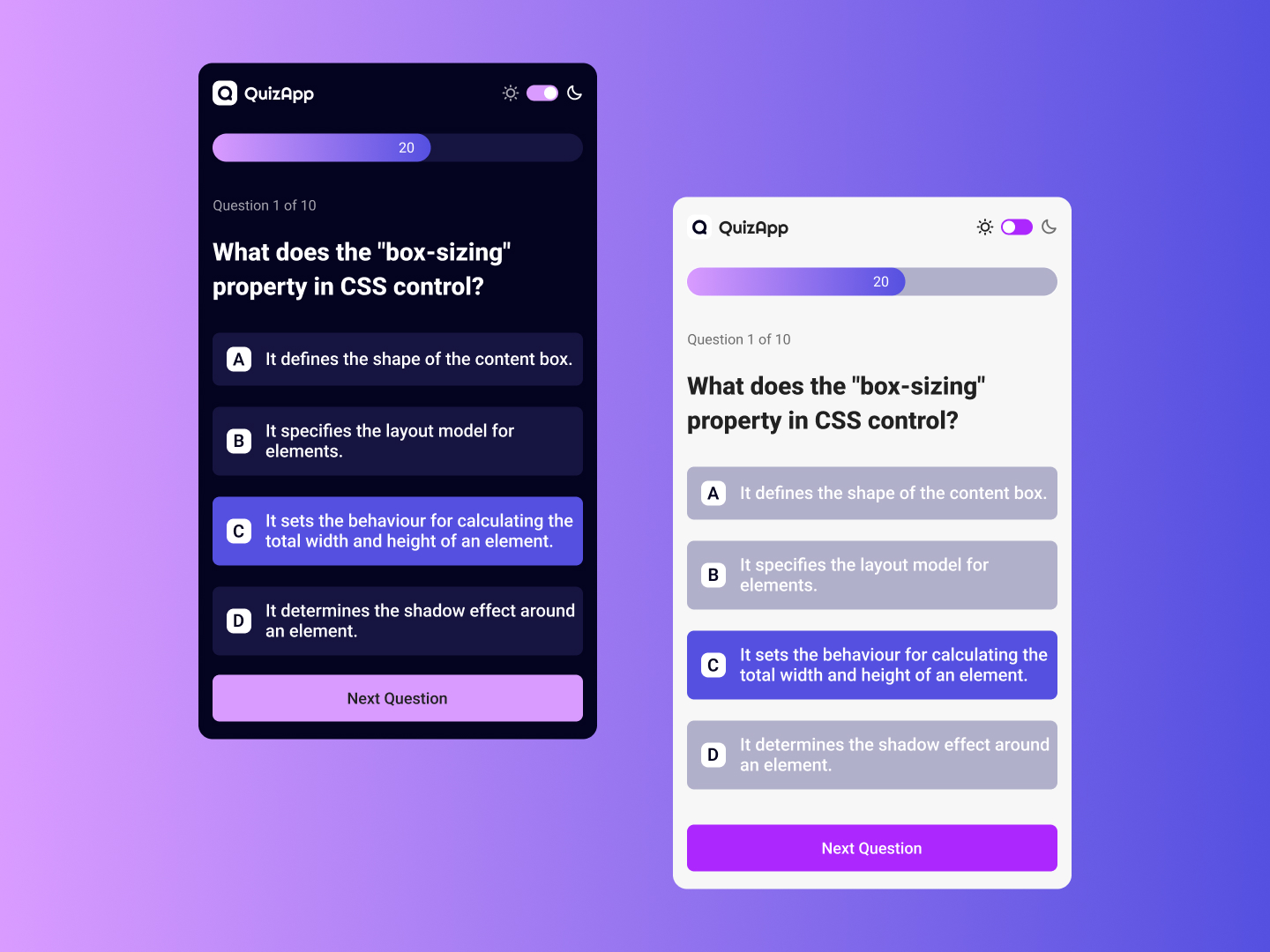
As a user participating in a quiz on a mobile app, I want to have a clean and intuitive interface that clearly displays the quiz questions and possible answers, so that I can easily select my answer and proceed to the next question.
Acceptance Criteria
- ✓ Display the quiz question prominently at the top of the screen, with a clear progress indicator (e.g., "Question 1 of 10") to inform users of their current progress.
- ✓ Provide four answer options (A, B, C, D) below the question, each with sufficient spacing and a distinct button or selection box.
- ✓ Highlight the selected answer with a different background color to indicate the user's choice.
- ✓ Include a "Next Question" button below the answers to proceed to the next question. This button should be clearly visible and accessible.
- ✓ Implement a toggle for light and dark modes to accommodate user preferences for different visual environments. Ensure that both modes offer a clear contrast between text and background for readability.
- ✓ The design should be responsive and maintain a consistent user experience across different screen sizes.
100 Days of Code Progress Day 91 / 100
Take this challenge
Start your 7-day free trial to solve this challenge in our built-in code editor with live preview.
Start 7-Day Free Trial to Solve This Challenge