Day 90 Advanced
Challenge 90 of 100
My Devices
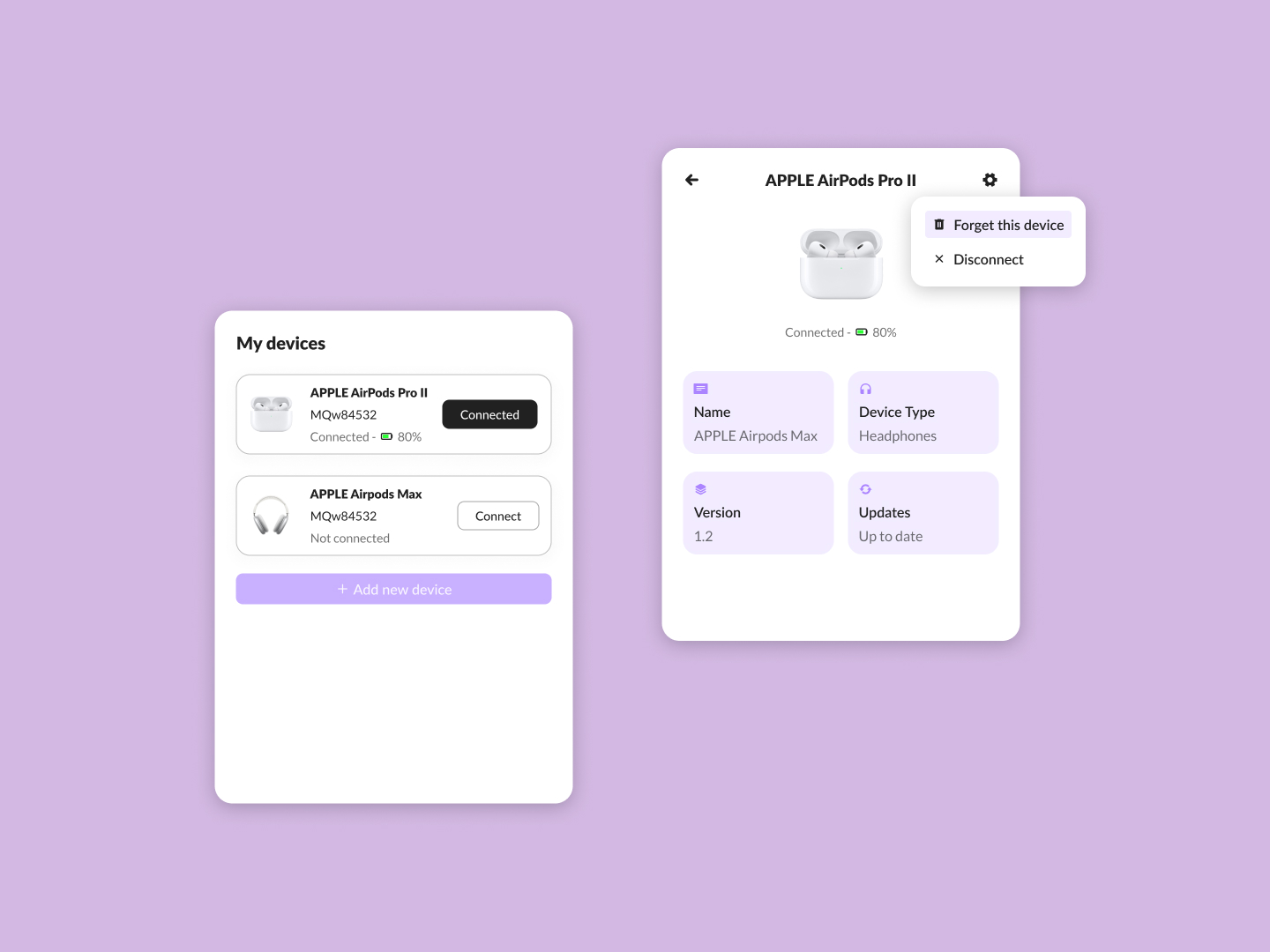
As a user managing multiple Bluetooth devices, I want to easily connect, disconnect, and manage settings for each device, so that I can quickly switch between devices and ensure they are updated and functioning properly.
Acceptance Criteria
- ✓ Display a list of paired devices under "My devices," with the status (connected or not connected) clearly indicated.
- ✓ For connected devices, show the battery percentage next to the connection status to help users monitor battery life.
- ✓ Include an option to "Add new device" for pairing additional devices.
- ✓ When a device is selected, show detailed information on a separate screen, including:
- ✓ The name of the device.
- ✓ The type of device (e.g., headphones).
- ✓ The current version of the device firmware.
- ✓ The update status (whether it's up to date or requires updating).
- ✓ Provide options to "Forget this device" or "Disconnect" from the selected device, easily accessible from a dropdown or settings icon.
- ✓ Ensure the design is clean and consistent, with a focus on simplicity and ease of use for switching between devices or managing device settings.
100 Days of Code Progress Day 90 / 100
Take this challenge
Start your 7-day free trial to solve this challenge in our built-in code editor with live preview.
Start 7-Day Free Trial to Solve This Challenge