How to Learn React by Building Real Projects (Not Just Tutorials)
Introduction
I’ve talked to hundreds of developers who say the same thing: “I’ve watched every React tutorial on YouTube, but I still can’t build anything on my own.” That’s not a motivation problem. It’s a method problem.
Tutorials create an illusion of understanding. You follow along, the code works, and you feel like you’ve learned something. But when you open a blank editor and try to build something from scratch, you freeze. You don’t know where to start, how to structure your components, or how to handle the dozens of small decisions that tutorials make for you without explaining why.
The fix is straightforward: build real projects. Not clones of tutorials with different variable names. Actual projects with requirements, professional designs, and problems you have to solve yourself.
I’m going to walk you through five React projects you can build today on BigDevSoon, each targeting specific React concepts. Then I’ll show you how to supplement that learning with focused challenges that reinforce what you’ve built.
Why Tutorials Fail
Tutorials aren’t useless — they’re just incomplete. They excel at introducing syntax and showing what’s possible. They fail at three critical things:
1. They remove all decision-making. A tutorial tells you to create a Header component. In a real project, you have to decide: Should this be one component or three? Should it use state or props? Where does the navigation data come from? Tutorials skip these decisions entirely, which means you never practice making them.
2. They follow the happy path. Tutorials rarely show you what happens when the API returns an error, when the user resizes the browser, when localStorage is full, or when a component receives unexpected props. Real apps break in dozens of ways that tutorials never address.
3. They don’t build muscle memory. Watching someone type useState is not the same as writing it yourself, making a mistake, debugging it, and fixing it. Learning happens in the struggle, not in the watching.
The solution isn’t to avoid tutorials entirely. It’s to spend 20% of your time on tutorials and 80% on building. The comparison between BigDevSoon and freeCodeCamp highlights this difference well — structured learning has its place, but project-based practice is what makes concepts stick.
The Project-Based Approach
Building projects works because it forces you to confront every part of development at once: planning, architecture, implementation, debugging, and polish. Here’s how to approach it effectively.
Start with a design, not a blank canvas. One of the biggest blockers for self-taught developers is not knowing what to build or how it should look. Working from a Figma design eliminates that problem. You focus entirely on implementation — translating a visual spec into working code. This is exactly what professional frontend work looks like. Every project on BigDevSoon includes Figma designs, which removes the “what should I build” paralysis entirely.
Use a React-ready browser editor. You don’t need to spend 30 minutes setting up a local environment before you can write your first line of React. BigDevSoon’s browser code editor supports React with live preview, npm package imports via CDN, and multiple CSS modes — all running directly in the browser. It’s the fastest way to go from idea to working React code. The editor supports 7 framework modes total (React, Vue, TypeScript, Angular, Svelte, Vanilla JS, and ES Modules), but for learning React specifically, the React mode gives you JSX support, hooks, and component rendering out of the box.
Break it into tasks. Don’t try to build the entire app in one sitting. BigDevSoon projects come with task cards that split the work into discrete pieces: set up the layout, build the data fetching, implement the filter logic, handle errors. Each completed task gives you momentum and a working piece of the app.
Get stuck on purpose. When you don’t know how to implement something, resist the urge to look it up immediately. Spend 15-20 minutes trying to figure it out. Read the error messages. Check the React docs. Try a different approach. The time you spend struggling is when the deepest learning happens. When you do need help, BigDevSoon’s Merlin AI assistant can explain concepts and review your code — it’s designed for learning, not just code generation.
5 React Projects to Build (Ordered by Difficulty)
Each project below is available on BigDevSoon with professional Figma designs and structured task cards. I’ve chosen these five specifically because they cover the React concepts that matter most for getting hired.
1. Pokedex
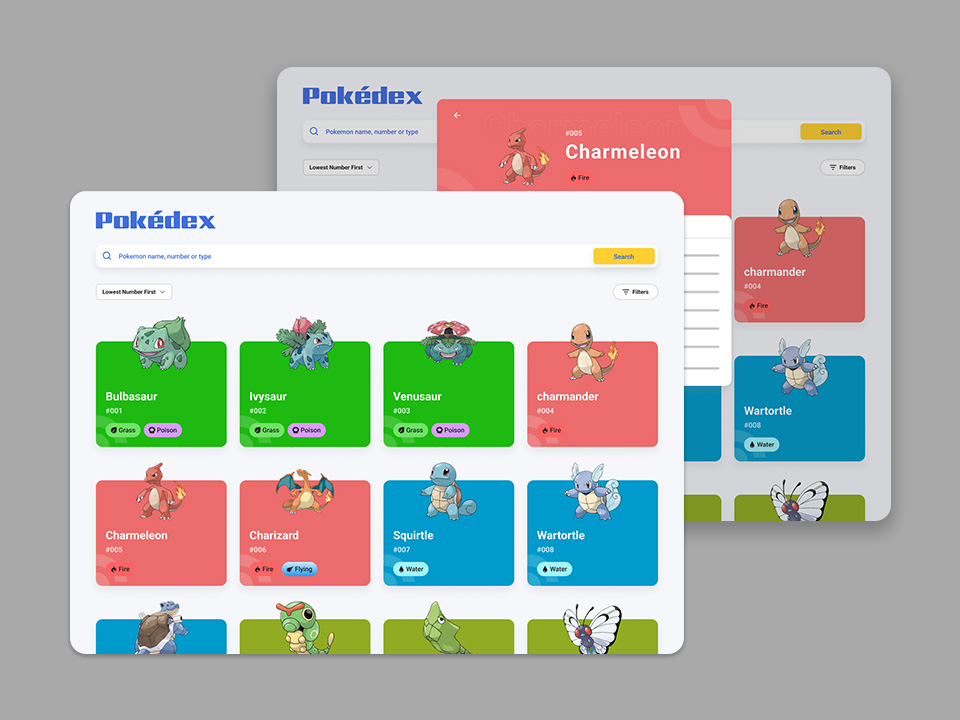
The Pokedex is a Junior-level project with 8 task cards. You’ll build a searchable Pokemon grid that fetches data from the PokeAPI, with sorting, filtering, and detail views.
Key React concepts it teaches:
useStateanduseEffectfor fetching Pokemon data and managing search/filter state- Conditional rendering for loading spinners, error messages, and empty states
- Component composition — breaking the UI into PokemonCard, PokemonGrid, SearchBar, and FilterPanel components
- Derived state — filtering and sorting the Pokemon array based on user input without duplicating data in state
What to focus on: The search and filter combination. When users can search by name AND filter by type AND sort by different criteria simultaneously, you have to think carefully about how these states interact. This is the exact pattern behind every product listing, user directory, and data table in production apps.
Why this project for React: It’s the ideal first React project because it covers the core loop — fetch data, render a list, handle user interactions — without overwhelming complexity. The 8 task cards keep you moving forward instead of getting lost in scope creep.
2. Quiz App
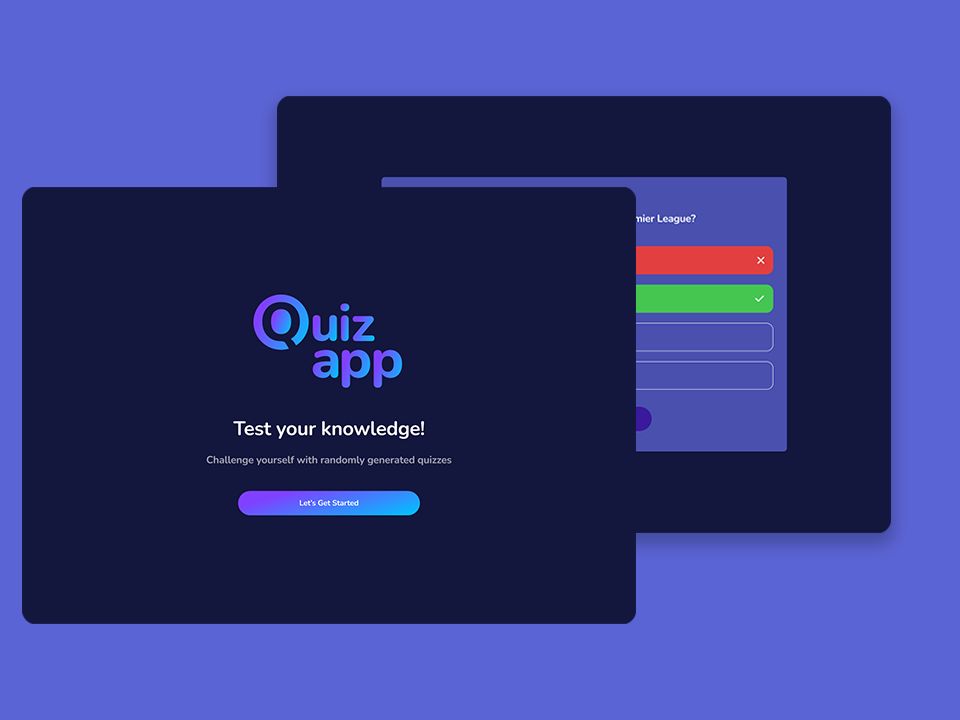
The Quiz App is Junior-level with 7 task cards. You’ll build a quiz with multiple-choice questions, scoring, timers, and a results screen.
Key React concepts it teaches:
- State machines — the quiz moves through distinct phases (intro, active question, answer feedback, results), and managing these transitions cleanly is core React architecture
useEffectfor timers — running countdown timers that clean up properly when the component unmounts or the question changes- Lifting state up — the score, current question index, and timer state need to be accessible across multiple components
- Event handling — processing answer selections, preventing double-clicks, and updating state based on user actions
What to focus on: Timer cleanup. When a user answers a question before the timer expires, you need to clear the existing timer and start a new one for the next question. Getting this right with useEffect cleanup functions is one of the most common sources of bugs in React apps, and this project gives you repeated practice with it.
Why this project for React: State management is the heart of React, and a quiz app is pure state management. There’s no API complexity or layout challenges to distract you — just the core challenge of managing application state across component boundaries.
3. Todo App
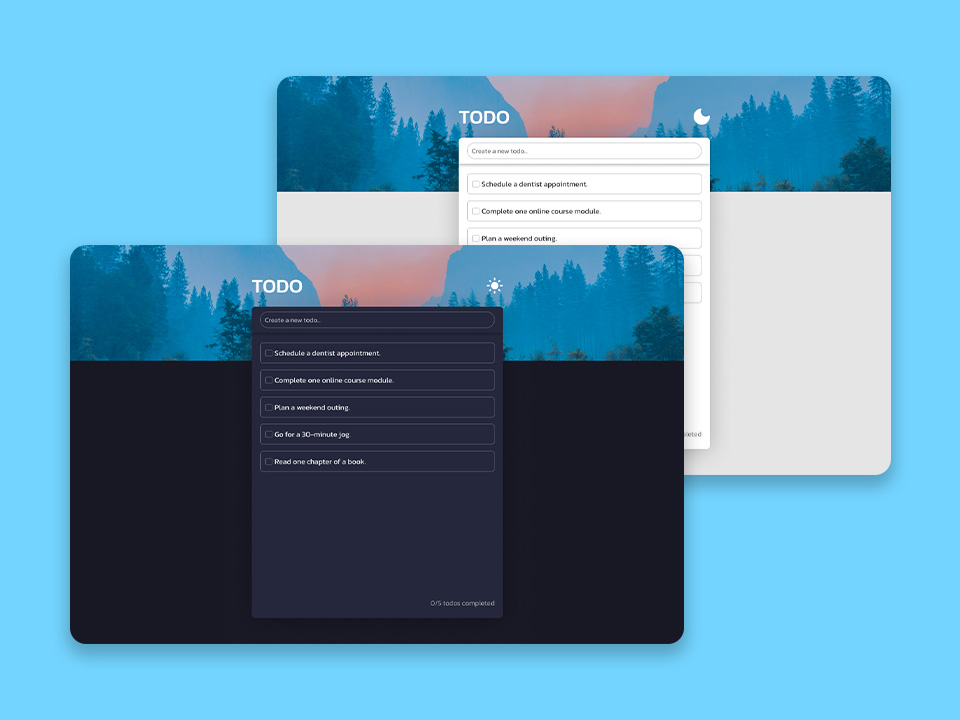
The Todo App is Junior-level with 6 task cards. Beyond basic task management, you’ll implement dark/light theme switching and drag-and-drop reordering.
Key React concepts it teaches:
- Context API for theme management — toggling between dark and light mode is the classic Context use case
useReducerfor complex task operations (add, delete, toggle, reorder) — this is where you’ll see whyuseReducerexists and when it’s better thanuseState- Controlled components for the task input form with validation
- Custom hooks — extracting
useThemeanduseLocalStorageteaches you the pattern you’ll use constantly in production code
What to focus on: The drag-and-drop reordering. Implementing drag-and-drop in React forces you to understand the relationship between React state and DOM state. When a user drags a task, you need to update the array order in state, which triggers a re-render, which updates the DOM. Getting this flow right teaches you more about React’s rendering model than any tutorial.
Why this project for React: The combination of Context (themes), useReducer (task state), custom hooks (localStorage), and drag-and-drop gives you practice with React patterns that most tutorial projects never touch.
4. Find Movies
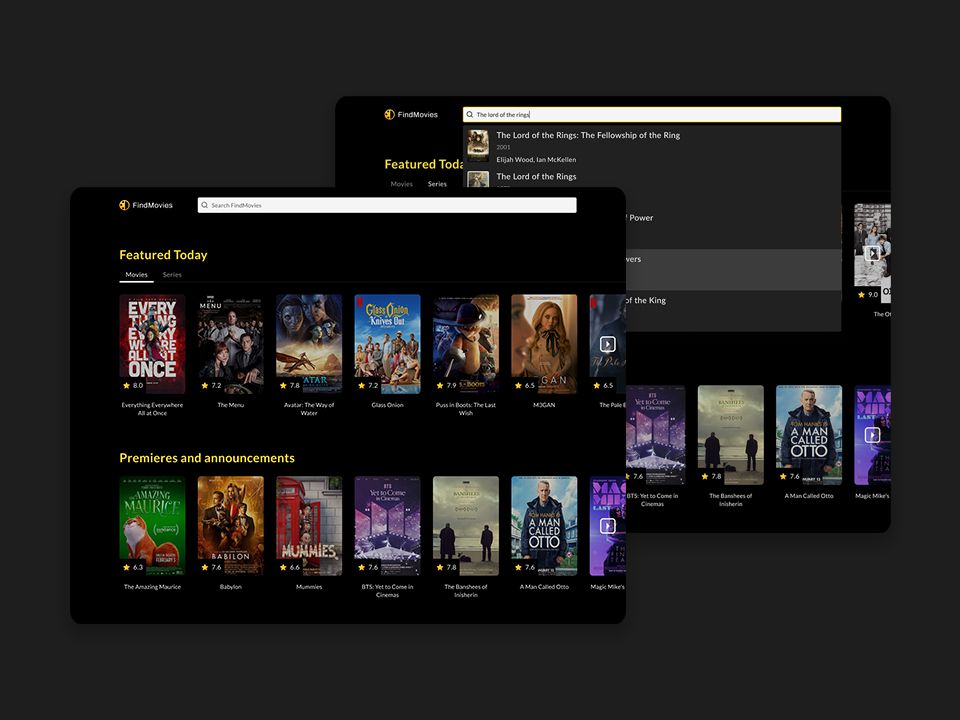
Find Movies is Regular difficulty with 9 task cards — a substantial step up from the Junior projects. You’ll build a movie discovery app with external API integration, debounced search, infinite scroll, and detailed movie pages.
Key React concepts it teaches:
- Custom hooks for data fetching — extracting
useMovieSearchanduseInfiniteScrollteaches you to encapsulate complex async logic in reusable hooks - Debouncing with
useCallbackanduseRef— preventing API calls on every keystroke while keeping the search responsive - React Router for navigating between the search results page and individual movie detail pages
IntersectionObserverwithuseEffectfor infinite scroll — loading more results as the user scrolls to the bottom- Performance optimization with
React.memoanduseCallbackto prevent unnecessary re-renders in the movie list
What to focus on: The debounced search implementation. Build it yourself before reaching for a library. Understanding how useRef holds the timeout ID across renders while useCallback stabilizes the handler reference is one of those “aha” moments that unlocks a deeper understanding of hooks. Modern CSS can handle some of the layout and animation patterns in this project without JavaScript, which is worth exploring.
Why this project for React: This is where you transition from “I can build simple React apps” to “I understand React performance and architecture.” The combination of debouncing, infinite scroll, routing, and custom hooks covers the patterns that mid-level React developers use daily.
5. Dashboard
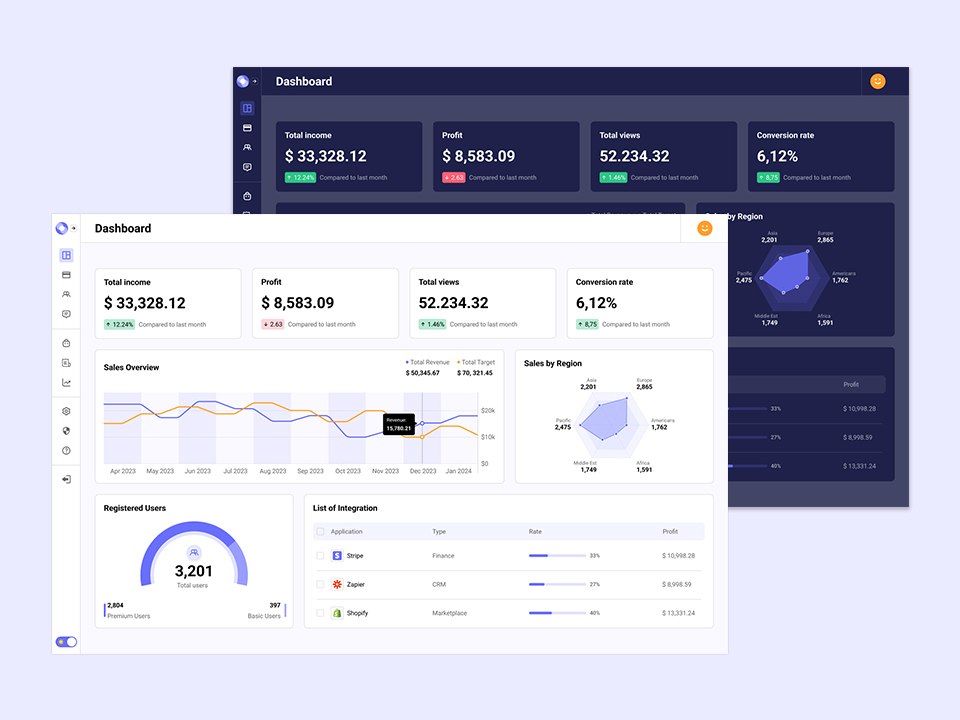
The Dashboard is Senior-level with 14 task cards — the most substantial project on the platform. You’ll build an analytics dashboard with charts, data tables, date range filters, and a responsive sidebar layout.
Key React concepts it teaches:
- Complex component architecture — the dashboard has a sidebar, header, chart panels, data tables, and filter controls that all need to communicate
- Third-party library integration — working with chart libraries (Recharts or Chart.js) teaches you to bridge between React’s component model and imperative library APIs
useMemofor expensive computations — when you’re aggregating data for charts from hundreds of records, you’ll feel the performance difference and understand when memoization actually matters- Responsive design in React — managing a collapsible sidebar, responsive chart layouts, and mobile-friendly tables with React state
- Advanced
useEffectpatterns — coordinating data fetches when multiple filters change, avoiding race conditions, implementing proper loading states
What to focus on: The interaction between filters and charts. When a user changes the date range, every chart and table needs to update. Managing this data flow cleanly — without prop drilling through five levels of components and without triggering unnecessary re-renders — is the architectural challenge that separates junior from senior React developers.
Why this project for React: If you can build a responsive dashboard with charts, tables, and filters, you can build anything a B2B company will ask you to build. This project is a portfolio centerpiece that speaks directly to hiring managers.
Challenges That Complement React Learning
Between projects, BigDevSoon’s 100 Days of Code challenges give you focused, single-day builds that reinforce specific skills. Here are the ones that pair best with React learning:
Kanban Board challenge — Build a drag-and-drop task board in a single session. This reinforces the drag-and-drop concepts from the Todo App and adds column-based state management. Perfect practice for React state architecture.
Shopping Cart challenge — Build a cart with add/remove/quantity controls and a total calculation. This is pure useReducer practice — the cart reducer pattern is one of the most common in e-commerce React apps.
Contact Form challenge — Build a form with validation and submission handling. Controlled components, form state management, and validation logic — all core React patterns compressed into a single challenge.
Notifications challenge — Build a notification system with different types, auto-dismiss timers, and stacking. This is an excellent exercise in useEffect cleanup and managing dynamic lists with animations.
Password Generator challenge — Build an interactive generator with options for length, character types, and a copy-to-clipboard feature. Great practice for controlled inputs and derived state.
Each challenge comes with a Figma design, so you’re always building from a professional spec. They’re designed to be completed in a few hours, making them ideal for weekday practice alongside your longer weekend project work.
For additional focused practice, BigDevSoon also offers 40+ practice problems with built-in test cases. These are shorter, algorithm-style exercises that sharpen specific JavaScript and React skills — think of them as the drills between the games.
Tools You Need
A React-ready editor. VS Code is the standard for local development, but BigDevSoon’s browser editor lets you write React with JSX, import npm packages, and see live preview — all without leaving the browser. It’s useful for prototyping ideas quickly and working through challenges without the overhead of local setup.
React DevTools. Install the browser extension. It lets you inspect component trees, track state changes, and profile renders. You’ll use it constantly when debugging why a component re-renders too often.
A design reference. Building from a Figma design is fundamentally different from improvising UI. It teaches you to match spacing, typography, and color systems — skills you’ll need on any team. Every BigDevSoon project includes Figma designs for exactly this purpose.
AI assistance, used correctly. AI can accelerate learning when used as a tutor, not a crutch. Ask it to explain why your approach isn’t working, not to write the solution for you. BigDevSoon’s Merlin AI assistant can review your code, explain concepts, and give feedback — it’s designed for learning, not just code generation.
A Practical Learning Path
If I were starting React from scratch today, here’s exactly how I’d structure my learning using BigDevSoon:
Weeks 1-2: Pokedex. Get comfortable with useState, useEffect, and component composition. Build the search and filter logic yourself. Do 2-3 challenges from the 100 Days of Code on weekday evenings — the Profile Card challenge, Product Page challenge, and Recipe Page challenge are good warm-ups.
Weeks 3-4: Quiz App + Todo App. Focus on state management depth. The Quiz App teaches you state machines and timer cleanup. The Todo App introduces Context, useReducer, and custom hooks. Do the Contact Form challenge and Sign-Up Form challenge as supplementary challenges.
Weeks 5-7: Find Movies. This is where it gets real. Debouncing, infinite scroll, routing, custom hooks, and performance optimization. Take your time with this one. Do the Kanban Board challenge and Shopping Cart challenge as weekend challenges to reinforce the patterns.
Weeks 8-10: Dashboard. The capstone project. Charts, tables, filters, responsive layouts, and complex component architecture. When you finish this, you’ll have a portfolio piece that demonstrates senior-level React skills.
That’s 10 weeks from zero to a portfolio with five real projects, each built from professional Figma designs. For comparison, most bootcamps take 12-16 weeks and cover less practical ground. The comparison of the best coding platforms in 2026 breaks down the differences in more detail.
Getting Started
Pick the project that matches your current level and start today. If you’ve never built anything in React, begin with the Pokedex. If you’re comfortable with basics but want to level up, jump to Find Movies. If you want the project that will make your portfolio stand out, go straight to the Dashboard.
If you’re ready to start building, BigDevSoon is running a spring sale — use code SPRING50 for 50% off all plans. See plans.
Every project comes with Figma designs, structured task cards, and the Merlin AI assistant to help when you get stuck.
The developers who break out of tutorial hell in 2026 won’t do it by finding a better tutorial. They’ll do it by closing the tutorial, opening an editor, and building something real. Start today.
Practice what you just learned in our browser editor with AI assistance.
Try Demo Editor
Creator of BigDevSoon
Full-stack developer and educator passionate about helping developers build real-world skills through hands-on projects. Creator of BigDevSoon, a vibe coding platform with 21 projects, 100 coding challenges, 40+ practice problems, and Merlin AI.


Related Posts
12 Frontend Project Ideas That Will Level Up Your Skills in 2026
The best frontend project ideas for 2026 — from beginner to advanced. Build real-world apps, practice React, CSS, JavaScript, and land your first dev job.
Best Vibe Coding & Practice Platforms in 2026: An Honest Guide
Comparing BigDevSoon, Frontend Mentor, LeetCode, and freeCodeCamp — vibe coding, traditional practice, pricing, and which platform fits your learning style.

10 Tips for Developer Job Seekers in 2026
Practical advice for developers looking for jobs in 2026 — from ATS-optimized CVs to portfolio strategy, interview prep, and standing out.
Quick Knowledge Pills

Event handlers arguments in React
onClick, onChange, onBlur... We usually pass a reference to the function handler but how do we add more arguments instead of just the event itself?

React counter hook
Let's create a custom hook for tracking the counter state and exposing the current counter value with increment, decrement handlers.

React Dark Mode hook
We'll create useDarkMode hook to switch between light and dark themes.